
If you’ve been exploring AI tools or Claude vs claude code recently, you’ve probably come across both Claude AI and Claude Code. Since they share the same “Claude” name and are developed by Anthropic, many people assume they are the same product. In reality, they are built for very different purposes.
One is a powerful AI assistant that helps with writing, research, brainstorming, and everyday tasks. The other is an AI coding agent designed to help developers write, understand, edit, and manage software projects.
This confusion has made “Claude vs Claude Code” one of the most searched AI comparisons in 2026. Whether you’re a beginner, blogger, student, programmer, or software developer, choosing the right tool can save you time and improve your productivity.
In this beginner-friendly guide, you’ll learn:
- What Claude AI is
- What Claude Code is
- The major differences between them
- Features, pricing, and use cases
- Which tool is best for your needs
- Whether you should use one or both together
By the end of this guide, you’ll know exactly which Claude product fits your workflow.
Claude vs Claude Code: Quick Answer
If you’re looking for a quick answer, here it is.
Claude AI is a general-purpose AI assistant that helps with writing, learning, research, brainstorming, document analysis, and answering questions. It is designed for almost everyone, including beginners, students, professionals, marketers, and content creators.
Claude Code, on the other hand, is built specifically for software developers. Instead of simply generating code snippets, it can understand an entire codebase, edit multiple files, help debug applications, automate development tasks, and work directly from your terminal.
In simple words
- Choose Claude AI if your goal is writing, studying, research, or everyday productivity.
- Choose Claude Code if your goal is software development, debugging, automation, or managing large coding projects.
Many professionals actually use both tools together because each solves a different problem.
Claude vs Claude Code: Feature Comparison
| Feature | Claude AI | Claude Code |
|---|---|---|
| Primary purpose | General AI assistant | AI coding agent |
| Best for | Beginners, students, writers | Developers and software engineers |
| Interface | Web app and mobile app | Terminal and development environment |
| Main tasks | Writing, research, summaries | Coding, debugging, automation |
| Code generation | Yes | Advanced |
| Multi-file editing | No | Yes |
| Repository understanding | No | Yes |
| Executes development workflows | No | Yes |
| Learning curve | Easy | Moderate to advanced |
| Ideal user | General users | Technical users |
Quick takeaway: Claude AI focuses on conversations and productivity, while Claude Code focuses on software development.
What Is Claude AI?
Claude AI is an advanced conversational AI assistant developed by Anthropic. It is designed to help users complete everyday tasks using natural language.
Unlike traditional search engines, Claude AI can understand context, maintain conversations, explain concepts, summarize information, and generate original content.
People commonly use Claude AI for:
- Writing blog posts
- Drafting emails
- Creating social media content
- Summarizing PDFs and reports
- Brainstorming ideas
- Learning new topics
- Translating text
- Solving math and reasoning problems
- Creating study notes
- Answering general questions
One of Claude AI’s biggest strengths is its ability to understand long documents and provide clear, well-structured responses.
If you’re completely new to Claude, check out our detailed guide: What is Claude AI (keep your existing internal link here).
Who Should Use Claude AI?
Claude AI is an excellent choice for:
Students
Students can use Claude AI to simplify difficult concepts, prepare notes, summarize textbooks, generate practice questions, and improve their writing.
Bloggers and Content Creators
If you create online content, Claude AI can help with:
- Article outlines
- SEO-friendly blog posts
- Video scripts
- Product descriptions
- Content ideas
- Grammar improvements
Business Professionals
Professionals often use Claude AI for:
- Meeting summaries
- Business reports
- Email drafting
- Proposal writing
- Research
- Presentation preparation
Beginners
One of Claude AI’s biggest advantages is that you don’t need any technical knowledge. If you can type a question, you can use Claude AI effectively.
What Is Claude Code?
While Claude AI is designed for conversations, Claude Code is designed for software development.
Claude Code is an AI coding assistant that works directly with your development workflow. Rather than answering coding questions one at a time, it can understand an entire software project and help developers build, edit, debug, and improve applications.
Instead of copying code between a chatbot and an editor, developers can work with Claude Code directly inside their terminal or development environment.
Claude Code can:
- Read an entire codebase
- Understand project structure
- Generate new features
- Edit multiple files automatically
- Refactor existing code
- Find and fix bugs
- Explain unfamiliar code
- Help migrate projects
- Assist with testing
- Automate repetitive development tasks
This makes it much more powerful than a traditional AI chatbot for programming.
If you’re planning to use it, don’t miss our beginner-friendly Claude Code Tutorial (keep your existing internal link here).
Why Claude Code Is Different
Many people think Claude Code is simply “Claude AI that writes code.”
That isn’t true.
Claude AI mainly responds to prompts during a conversation.
Claude Code works more like an AI teammate that can understand your project, make changes across multiple files, and help complete complex development tasks.
For example:
Imagine you’re building an e-commerce website with hundreds of files.
A normal chatbot might generate one function at a time.
Claude Code can understand the project structure, identify where changes are needed, update multiple files, explain its reasoning, and help test the implementation.
This ability to work across an entire project is what makes Claude Code especially valuable for professional developers.
Claude AI vs Claude Code: Core Difference Explained
The easiest way to understand the difference is this:
Claude AI answers your questions.
Claude Code helps complete your programming work.
For example:
If you ask:
“Explain how Python loops work.”
Claude AI will provide a detailed explanation with examples.
If you’re building a Python application and need to update multiple files, refactor code, and fix bugs across your project, Claude Code is the better choice because it is designed for development workflows rather than simple conversations.

Claude AI vs Claude Code: Key Differences Explained
Although Claude AI and Claude Code are built on Anthropic’s AI models, they solve very different problems. Understanding these differences will help you choose the right tool and avoid paying for features you don’t need.
Let’s look at the major differences one by one.
1. Purpose
The biggest difference is their primary purpose.
Claude AI is designed to help users communicate with AI through natural language. You ask questions, upload documents, request summaries, generate content, or brainstorm ideas, and Claude responds conversationally.
Claude Code, however, is designed to assist with software development. Instead of simply answering programming questions, it works alongside developers to understand projects, generate code, edit multiple files, and automate coding tasks.
In simple terms:
- Claude AI helps you think and create.
- Claude Code helps you build and develop software.
2. User Interface
Another major difference is how you interact with each tool.
Claude AI
Claude AI is available through an easy-to-use web interface where you type prompts just like chatting with a person. It is also accessible on supported desktop and mobile platforms.
Because everything happens through a conversational interface, beginners can start using it within minutes.
Claude Code
Claude Code works inside a developer’s workflow. Instead of chatting in a browser all day, developers use it through the terminal and development tools, allowing it to understand the project structure and perform coding tasks more efficiently.
This makes Claude Code much more powerful for programming, but it also means there is a learning curve.
3. Ease of Use
If you’re completely new to AI, Claude AI is the easier option.
You don’t need programming knowledge. Simply ask questions like:
- “Write a professional email.”
- “Summarize this PDF.”
- “Explain machine learning.”
- “Create a blog outline.”
Claude AI handles these requests naturally.
Claude Code is different.
It assumes you already understand software development concepts such as:
- Source code
- Git repositories
- Project folders
- Programming languages
- Command-line tools
- Development workflows
That’s why Claude Code is recommended mainly for developers and technical users.
4. Coding Capabilities
Many beginners ask:
“Can Claude AI write code?”
Yes.
Claude AI can generate:
- Python scripts
- HTML
- CSS
- JavaScript
- SQL queries
- Excel formulas
- Small automation scripts
However, its coding assistance is conversational.
Claude Code goes much further.
It can:
- Understand large software projects
- Navigate complex repositories
- Edit multiple files in one task
- Suggest improvements across the project
- Help refactor existing applications
- Explain unfamiliar code
- Assist with debugging
- Generate implementation plans
- Support testing workflows
For professional development, this makes a significant difference.
5. Working with Large Projects
Imagine you’re maintaining an application with hundreds of files.
Claude AI can explain code snippets when you paste them into the chat.
Claude Code can work with the broader project context, making it far better suited for larger software projects.
This ability saves developers considerable time during maintenance and feature development.
6. Automation
Automation is another area where Claude Code stands out.
Claude AI helps you complete individual tasks.
Claude Code helps automate development workflows such as:
- Updating repetitive code
- Refactoring existing modules
- Assisting with documentation
- Supporting code reviews
- Improving project consistency
This reduces repetitive work and lets developers focus on solving business problems.
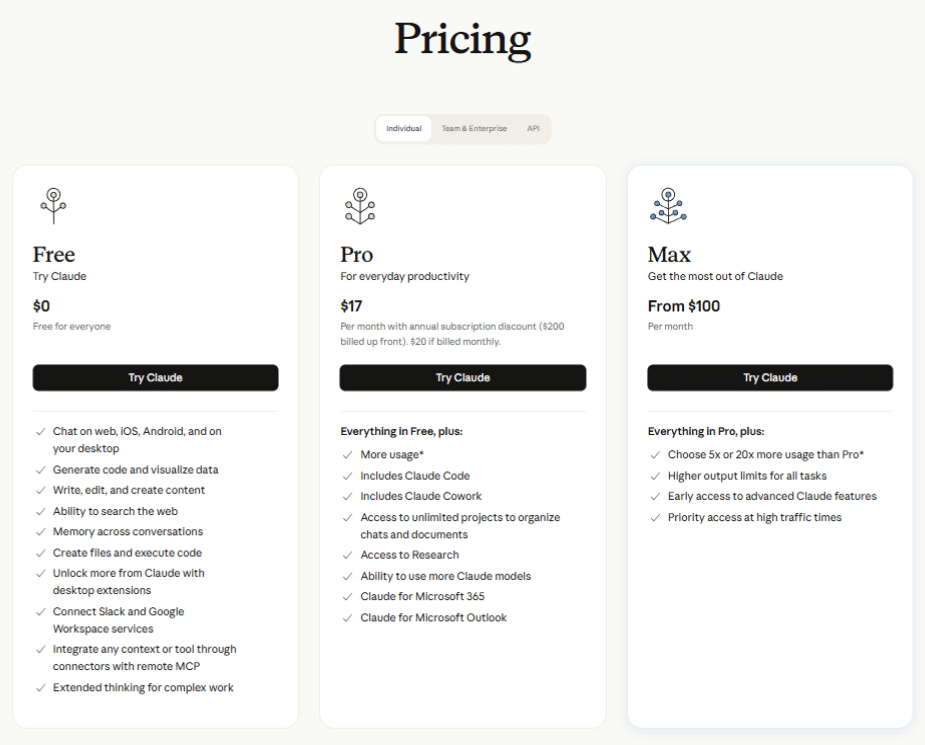
Claude AI vs Claude Code Pricing
Pricing is one of the biggest factors when choosing between these tools.
Since Anthropic updates plans periodically, it’s always a good idea to check the latest pricing on the official website before making a decision.
Claude AI Pricing
Claude AI generally includes:
- A free plan with usage limits
- Paid subscription plans with higher limits and access to more advanced models
A paid plan may be worthwhile if you:
- Use AI every day
- Write long articles
- Analyze large documents
- Need higher usage limits
- Rely on AI for work or study
Claude Code Pricing
Claude Code is designed primarily for developers and often uses API-based or usage-based billing.
Costs may depend on:
- API usage
- Token consumption
- Project size
- Frequency of use
- Model selection
If you’re working with large repositories or using Claude Code heavily in development workflows, your costs may be higher than using Claude AI for general conversations.
See the pricing screenshot from the official Claude website.
Supported Programming Languages
Claude Code supports development across many popular programming languages, including:
- Python
- JavaScript
- TypeScript
- Java
- C++
- C#
- Go
- PHP
- Ruby
- Rust
- Swift
- Kotlin
- HTML
- CSS
- SQL
Its usefulness comes not just from generating code but from understanding how these languages work together within a complete project.
Real-World Examples
Here are a few practical scenarios to show when each tool is the better choice.
Example 1: Writing a Blog Post
You want to write an SEO-friendly article about AI tools.
Best choice: Claude AI
It can help generate outlines, improve readability, explain concepts, and refine your writing.
Example 2: Building a Portfolio Website
You’re creating a website using HTML, CSS, and JavaScript.
Best choice: Claude Code
It can help organize files, improve structure, fix errors, and assist throughout the development process.
Example 3: Learning Python
You’re a beginner learning Python programming.
Best choice: Claude AI
It explains concepts step by step and answers beginner-friendly questions in simple language.
Example 4: Maintaining a Large Business Application
Your company has a project with hundreds of files that requires debugging and feature updates.
Best choice: Claude Code
Its ability to work across larger codebases makes it a better fit for professional software development.
Claude vs Claude Code: Best Use Cases
Choose Claude AI if you want to:
- Write blog posts
- Create social media content
- Summarize PDFs
- Learn new skills
- Brainstorm ideas
- Translate text
- Draft emails
- Prepare reports
- Improve writing
- Ask everyday questions
If you’re new to Claude, don’t forget to read our How to Use Claude AI (Step-by-Step) guide. (Keep your existing internal link here.)
Choose Claude Code if you want to:
- Build web applications
- Debug software
- Refactor existing projects
- Generate production-ready code
- Understand unfamiliar codebases
- Automate repetitive coding tasks
- Improve software quality
- Work more efficiently as a developer
Following is a screenshot of pricing at official claude website.
Pros and Cons of Claude AI
Like any AI tool, Claude AI has strengths and limitations. Understanding both can help you decide whether it matches your needs.
Pros
- Easy for beginners to learn and use
- Excellent for writing, research, and brainstorming
- Produces clear, natural-sounding responses
- Can summarize long documents and explain complex topics
- Useful for students, professionals, and content creators
- Supports a wide variety of everyday productivity tasks
Cons
- Cannot directly interact with your local development environment
- Limited when working with large software projects
- Doesn’t automate coding workflows like Claude Code
- Some advanced features may require a paid subscription
Pros and Cons of Claude Code
Claude Code is built for developers, offering powerful coding capabilities that go beyond a traditional AI chatbot.
Pros
- Understands large codebases
- Assists with debugging and refactoring
- Can edit multiple files within a project
- Helps automate repetitive development tasks
- Improves developer productivity
- Supports many popular programming languages
Cons
- Not intended for non-technical users
- Requires some familiarity with development workflows
- Usage costs can increase for large projects
- More complex to learn than Claude AI
Claude Code vs ChatGPT for Coding
Many readers also compare Claude Code with ChatGPT when choosing an AI coding assistant. While both can help developers, they are designed with different workflows in mind.
| Feature | Claude Code | ChatGPT |
|---|---|---|
| Best for | Large software projects | General coding help and explanations |
| Project awareness | Designed to work across codebases | Depends on how much context you provide |
| Multi-file editing | Yes | Limited without external tools |
| Debugging | Advanced | Good for many scenarios |
| Learning programming | Good | Excellent |
| Beginner-friendly | Moderate | Very beginner-friendly |
If you’re deciding between the two AI assistants, you may also find our Claude vs ChatGPT comparison helpful. (Keep your existing internal link here.)
Which one should you choose?
- If you’re learning programming, either tool can help explain concepts and generate sample code.
- If you’re maintaining or building larger applications, Claude Code offers capabilities that are specifically designed for development workflows.
Common Mistakes Beginners Make
Many first-time users misunderstand what each tool is designed to do. Avoid these common mistakes:
Expecting Claude Code to Replace a Programmer
Claude Code is a powerful assistant, but it doesn’t eliminate the need for software engineering knowledge. Developers still need to review, test, and validate AI-generated code.
Using Claude AI for Complex Development Workflows
Claude AI can generate code snippets, but it’s not designed to manage large repositories or automate software projects.
Choosing the Wrong Tool
Some users subscribe to Claude Code when they only need help writing articles or studying. Others rely solely on Claude AI for large coding tasks. Understanding your goals will help you choose the right product.
Ignoring AI-Generated Errors
Whether you use Claude AI or Claude Code, always review outputs carefully. AI can make mistakes, so it’s important to verify code, facts, and recommendations before using them in real projects.
Which Should You Choose?
The best choice depends entirely on how you plan to use AI.
Choose Claude AI if you are:
- A beginner exploring AI
- A student
- A blogger or content creator
- A marketer
- A business professional
- Someone looking for help with writing, learning, or productivity
Choose Claude Code if you are:
- A software developer
- A web developer
- A programmer working on large projects
- A technical professional who wants to automate parts of the development process
Can You Use Both Together?
Absolutely.
Many professionals use Claude AI to plan projects, write documentation, brainstorm ideas, or explain technical concepts. They then switch to Claude Code to implement, debug, and refine the actual software.
Using both tools together allows you to benefit from the strengths of each.
Frequently Asked Questions (FAQs)
Is Claude Code better than Claude AI?
No. They serve different purposes. Claude AI is ideal for writing, research, and everyday tasks, while Claude Code is designed specifically for software development.
Can Claude AI write code?
Yes. Claude AI can generate and explain code in many programming languages. However, it isn’t designed to work across complete software projects like Claude Code.
Is Claude Code free?
Pricing may vary depending on your usage and the available plans. Always check the official Anthropic pricing page for the latest information.
Is Claude Code suitable for beginners?
It depends. Beginners who are learning programming can certainly explore Claude Code, but those without technical knowledge may find Claude AI much easier to use.
Which programming languages does Claude Code support?
Claude Code can assist with many popular languages, including Python, JavaScript, TypeScript, Java, C++, C#, Go, PHP, Ruby, Rust, Swift, Kotlin, HTML, CSS, and SQL.
Can I use Claude AI and Claude Code together?
Yes. Many users rely on Claude AI for planning and documentation while using Claude Code for coding and development tasks.
Is Claude Code better than GitHub Copilot?
Both tools have strengths. GitHub Copilot focuses on code suggestions within supported editors, while Claude Code is designed to understand broader development workflows. The best choice depends on your workflow and requirements.
Does Claude AI require coding knowledge?
No. Claude AI is designed for users of all experience levels and can be used without any programming background.
Final Thoughts
Although their names are similar, Claude AI and Claude Code are built for different audiences.
If your goal is writing, learning, researching, or improving everyday productivity, Claude AI is the better option. It’s easy to use, beginner-friendly, and suitable for a wide range of tasks.
If you’re a developer working on software projects, Claude Code provides specialized tools to help you understand codebases, automate repetitive work, and streamline development.
Instead of asking which tool is “better,” ask which tool is better for your specific needs. In many cases, using both together can provide the most efficient workflow.
If you’re just getting started, we recommend exploring What is Claude AI and How to Use Claude AI (Step-by-Step) before moving on to the Claude Code Tutorial. (Keep your existing internal links here.)
Recommended Next Steps
Read Next: Claude Agent SDK vs Claude Code (2026)
Learn: How to Use Claude AI (Step-by-Step)
Read: What is Claude AI
Explore: Claude Code Tutorial
Compare: Claude vs ChatGPT
Discover: Best AI Tools for Beginners (2026 Guide)
Browse: AI Text Generators, AI Voice detector
About the Author
This article is published by the team at AI Tools Info, a platform dedicated to helping beginners learn and use AI tools in a simple and practical way.
Last Updated: 2026
Humans First, Machines Second: 30 Sparks to Reimagine Winning in the Age of AI
₹394.00 (as of October 11, 2026 13:13 GMT +00:00 – More infoProduct prices and availability are accurate as of the date/time indicated and are subject to change. Any price and availability information displayed on [relevant Amazon Site(s), as applicable] at the time of purchase will apply to the purchase of this product.)
Safe Minds, Smarter Machines
₹313.00 (as of October 11, 2026 13:13 GMT +00:00 – More infoProduct prices and availability are accurate as of the date/time indicated and are subject to change. Any price and availability information displayed on [relevant Amazon Site(s), as applicable] at the time of purchase will apply to the purchase of this product.)
AGI Chronicles
₹1,985.00 (as of October 11, 2026 13:13 GMT +00:00 – More infoProduct prices and availability are accurate as of the date/time indicated and are subject to change. Any price and availability information displayed on [relevant Amazon Site(s), as applicable] at the time of purchase will apply to the purchase of this product.)
Hands-On Machine Learning with Scikit-Learn, Keras, and TensorFlow: Concepts, Tools, and Techniques to Build Intelligent Systems, Third Edition (Full Colour Print)
₹3,250.00 (as of October 11, 2026 13:13 GMT +00:00 – More infoProduct prices and availability are accurate as of the date/time indicated and are subject to change. Any price and availability information displayed on [relevant Amazon Site(s), as applicable] at the time of purchase will apply to the purchase of this product.)